Tuesday, February 11, 2014
Single Table Inheritance
I'm currently building an app that needs to have a base model and sub-models. I wasn't sure how to do that, so I did some research online and found STI or Single Table Inheritance. The idea behind it is that the sub-models will inherit from the base model, so it will be able to use all of the attributes of the base model. In the migration of the base model you must have a type field. This is how rails knows that other models will be inheriting from this model. In the example below the singer and dancer models will inherit from the entertainer model, so now we can create a new entertainer object an be able to use the attributes associated with entertainer on that object.
Sunday, February 2, 2014
Lexical Scoping
In the example above I was able to find all of the even numbers in an array using lexical scoping and the .filter method. Because I defined the getNumbers function inside of the parent function getEvenNumbers the child function getNumbers knows about numbersArray. So when I call the .filter method it will iterate through each element in the array passed to numberArray then pass it to the callback function getNumbers which checks to see if each element is divisible by 2. .filter will return the results in a new array.
Monday, January 20, 2014
Anatomy of a JavaScript function
JavaScript functions are very different from Ruby methods. While reading Intro to Functions I became quite confused because I am so used to the way methods work in Ruby. I did understand some of it. Here is what I observed.
In JavaScript defining properties of pure functions is that they always return the same values when given the same arguments.
A function is built by first using the word function then the name we want to call the function followed by the names of the argument/s in parenthesis. Last would be the body of the function. Ex:
Return is used to define the value that the function returns. If there is no expression after return the function will return undefined
In this example both the top level variable and the local variable are named variable. The function printVariable is called inside of the function test. Even though printVariable was called inside of test the local variable is not available to the printVariable function.
Lexical Scoping is when a variable visibility is determined by the functions placement in the program text. Both local variables and top-level variables are visible. In the example because the child function was defined in the parent function the local variable from the parent function is the only variable visible to it.
In JavaScript defining properties of pure functions is that they always return the same values when given the same arguments.
A function is built by first using the word function then the name we want to call the function followed by the names of the argument/s in parenthesis. Last would be the body of the function. Ex:
Return is used to define the value that the function returns. If there is no expression after return the function will return undefined
In this example both the top level variable and the local variable are named variable. The function printVariable is called inside of the function test. Even though printVariable was called inside of test the local variable is not available to the printVariable function.
Lexical Scoping is when a variable visibility is determined by the functions placement in the program text. Both local variables and top-level variables are visible. In the example because the child function was defined in the parent function the local variable from the parent function is the only variable visible to it.
Sunday, January 19, 2014
Differences between JavaScript and Ruby
Next week at the Flatiron School we will be learning JavaScript. We were asked to blog about some the differences. Here is what I have observed.
Ruby
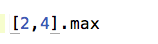
Math.max is the function that returns 4. In Ruby the method that does this is called max. The same example in Ruby would look like this:
Values
In JavaScript datatypes such as string or number are called values while in Ruby they are just called data types. Other values in JavaScript are booleans, objects, and, undefined values. Operators in JavaScript are used in the same way as they are in Ruby. One operator in JavaScript that I learned about is typeof. It can give you the type of value something is. Ruby has something similar which is the method class which can give you the class of an object.
Variables
JavaScript and Ruby both hold data in variables. In JavaScript syntax var is used before the variable name and in Ruby the variable name alone is used.
JavaScript
Ruby
Functions in JavaScript are similar to methods in Ruby. In JavaScript alert is a variable that contains a function that takes one parameter and shows the result of the expression. This example in JavaScript will return the largest number in the argument.
Math.max is the function that returns 4. In Ruby the method that does this is called max. The same example in Ruby would look like this:
Loops
Loops are used in Ruby and JavaScript in the same way, but the syntax is different. I will show an example of how a while loop looks in JavaScript vs. Ruby.
JavaScript
Ruby
Monday, January 6, 2014
MVC
I found this picture online which I felt was the clearest visual representation that I've seen of the MVC principle. Today at the Flatiron School we learned Rails which uses the MVC principle. I like to use CVM because it helps me to remember the order it actually flows in. Here I will go through what the Model, View, and Controller do in Rails.
Controller - has the actions that give orders to the Model
Model - when a migration is created the model talks to the database and retrieves the information that controller is asking for. The model inherits from ActiveRecord.
View - after model retrieves data from the database it sends the information to the controller. The controller then calls the view. The view displays the logic from the model in the form of HTML in the browser.
Sunday, January 5, 2014
The Box Model
Currently at The Flatiron School we are learning HTML and CSS, so I decided to blog about the box model because it's a very important part of HTML.
The box model is based on every element being a rectangular box that can have padding, margin, and border. Here is an example:
The element with it's content are surrounded by a padding, border, and margin. All make up the box model.
Margin - the margin is invisible and is used to give the element space from other elements on the page. Margin properties can be margin-top, margin-bottom, margin-left, and margin-right.
Ex:
Border - border creates a frame around an element. Border needs a width, style, and color. Border properties can be border-top, border-bottom, border-left, and border-right. Ex:
Padding - padding provides spacing within an element. Padding properties can be padding-top, padding-bottom, padding-left, and padding-right. Ex:
To calculate the total width of an element we would add margin-right + border-right + padding right + width + margin-left + border-left + padding left.
To calculate the total height of an element we would add margin-top + border-top + padding top + height + margin-bottom + border-bottom + padding bottom.
The box model is based on every element being a rectangular box that can have padding, margin, and border. Here is an example:
The element with it's content are surrounded by a padding, border, and margin. All make up the box model.
Margin - the margin is invisible and is used to give the element space from other elements on the page. Margin properties can be margin-top, margin-bottom, margin-left, and margin-right.
Ex:
Border - border creates a frame around an element. Border needs a width, style, and color. Border properties can be border-top, border-bottom, border-left, and border-right. Ex:
To calculate the total width of an element we would add margin-right + border-right + padding right + width + margin-left + border-left + padding left.
To calculate the total height of an element we would add margin-top + border-top + padding top + height + margin-bottom + border-bottom + padding bottom.
Tuesday, December 31, 2013
Build This Button in CSS Challenge

using just CSS. We first did one of our own then we were split into two teams where we were challenged to build it as a team. When doing my own I first thought it would be difficult because we were not allowed to modify the html. So I decided to do a search on how to use CSS to create buttons. One website showed how I could use display block within my anchor element selector to create a block, so I used that. Then I used properties like font-size, color, height, width etc. to get my block to look similar to the original block. I got stuck on making multiple blocks, so I did a web search again and found that to do this I needed to create two block shadows like so box-shadow: 0 0 0 3px #888888, 0 0 0 6px #000;. That worked, but it didn't really give me the desired effect. When we started the team challenge my button was not complete, but there were others on my team who had completed theirs. When looking at my team members code I saw some things that I could have done differently. Since we could not touch the html I could have used text-transform to make all of the letter capital. I could have used 4 different box shadows. In the code the team used each line was to show each of the margins. I also learned that you can use CSS symbols to get those stars to appear.
This is the type of question that is asked in interviews. Now that I have tried this on my own and now know the solution. I would attempt to do this differently. I would first figure out what type of block I would need then I would look at the code to see how many margins I would need. I think that once I am able to figure those out then the rest will be easier for me.
Sunday, December 29, 2013
Sunday, December 15, 2013
| |= and &&=
I decided to post on the | |=(or equals) because I saw it recently in another student's code and I had never seen it before. Here is an example:
Sunday, December 8, 2013
REXML and Nokogiri
When I started working on the Economics XML challenge I didn't realize that REXML and Nokigiri were both parsers that do the same things, but there are some differences, so I decided to the a post on a few. REXML is a parser that is already built into Ruby while we have to install a gem to use Nokogiri. REXML is also an older and slower parser, so many prefer to use Nokogiri. In REXML in order to access nodes it uses XPath which is a language for selecting nodes from an XML document, the match method, and the attributes method all used to access elements or nodes in an XML or HTML file while in Nokogiri the only method necessary to access elements is search and the tag name. Here is an interesting tutorial I found on scraping with Nokogiri
Faith
I found the article really interesting. I enjoy being at the Flatiron School, but I sometimes find myself frustrated because I am struggling a bit. I compare myself to my classmates who are all doing so well and who came from such accomplished backgrounds that I sometimes feel like I'm not supposed to be here. Of course I know better but those thoughts do cross my mind. The article gives me hope that I will one day become a good programmer. Just because I may not be a great programmer right now doesn't mean I will never be. I just need to have faith and to continue to stick with. It's ok to fail because many have, but continued on to become good developers. The article also mentions knowing what it is you want to code. I'm excited about that because I've never really thought about what type of programs I would like to build. Maybe thinking about things like that will make this process easier for me. I will try anything.
Wednesday, November 20, 2013
Designing classes with single responsibility
The single responsibility principle is using classes in our application that each have only one responsibility. Classes that have more than one responsibility can become too convoluted and can break more easily. The type of programs we want to make involves creating code that is reusable. Classes that have more than one responsibility are difficult to reuse, so having classes that do one thing is very important. One question that I had while reading this was how would I know if the class I built only has one responsibility. The chapter gave some helpful tips on how to determine this. One was making the methods into a question. If the methods seems to be doing different unrelated things then we don't want that. Another was to describe the class in one sentence. If the sentence has "and" or "or" in it then the class most likely has more than one responsibility. Overall our class methods should all be related and work to towards one common goal.
Tuesday, November 19, 2013
Iteration Viz
Iteration reminds me of mince meat grinder. A mince meat grinder takes in meat does something inside of it that minces the meat and produce the outcome. It will do this over and over. In iteration the iterator will go through an array take each take element and produce some sort of out come.
Saturday, November 16, 2013
Iteration in JavaScript vs. Ruby
During class we used this javascript iteration example:
to demonstrate how iteration works. We were then asked to do the same iteration example in Ruby.
This is mine:
In my opinion the JavaScript example was a lot clearer. After seeing it I understood better how iteration works because each step was shown. In the Ruby example all of the steps are inside of the .times method, so it's harder to understand the concept when all of the steps are hidden. I like that the words state, condition, and increment were used to explain iteration in JavaScript. In the example i = 0 is the current state of i, i < 101 is the condition that has to be met, and i++ is the increment meaning what we want to increment i by in this case we want to increment i by 1. When facing an iteration problem that I don't understand I can refer to those words to get me on track. I was studying Ruby for a little bit before this program and thought I fully understood iteration, but after this lecture realized I didn't know it that well at all. So this was very helpful for me. JavaScript is clearer to me when it comes to iteration, but to learn Ruby and JavaScript simultaneously maybe a bit difficult for me at this point because I'm still trying to understand the concepts of programming, but if there are concepts other than iteration in JavaScript that can help me understand Ruby better then I'm all for it.
to demonstrate how iteration works. We were then asked to do the same iteration example in Ruby.
This is mine:
In my opinion the JavaScript example was a lot clearer. After seeing it I understood better how iteration works because each step was shown. In the Ruby example all of the steps are inside of the .times method, so it's harder to understand the concept when all of the steps are hidden. I like that the words state, condition, and increment were used to explain iteration in JavaScript. In the example i = 0 is the current state of i, i < 101 is the condition that has to be met, and i++ is the increment meaning what we want to increment i by in this case we want to increment i by 1. When facing an iteration problem that I don't understand I can refer to those words to get me on track. I was studying Ruby for a little bit before this program and thought I fully understood iteration, but after this lecture realized I didn't know it that well at all. So this was very helpful for me. JavaScript is clearer to me when it comes to iteration, but to learn Ruby and JavaScript simultaneously maybe a bit difficult for me at this point because I'm still trying to understand the concepts of programming, but if there are concepts other than iteration in JavaScript that can help me understand Ruby better then I'm all for it.
Thursday, November 14, 2013
Fizzbuzz
I'm having some git issues, so I'm just going to take a screen shot of my code and of the solution that differs.
In my solution I used next because when I tried it not using next it kept printing 0, so I used the code on line 1 and it omitted it. The code on line 4 says that if i has no reminder when divided by 3 and 5 it should print "fizzbuzz". I wrote the code on the bottom at first but because the other two conditions were already met it didn't work. Once I changed the order it worked.
The solution above I got from gist. This solution differs from mine. This solution uses a .each iterator and it puts the whole code in one block. Also this solution using 15 instead of 3 and 5.
In my solution I used next because when I tried it not using next it kept printing 0, so I used the code on line 1 and it omitted it. The code on line 4 says that if i has no reminder when divided by 3 and 5 it should print "fizzbuzz". I wrote the code on the bottom at first but because the other two conditions were already met it didn't work. Once I changed the order it worked.
The solution above I got from gist. This solution differs from mine. This solution uses a .each iterator and it puts the whole code in one block. Also this solution using 15 instead of 3 and 5.
Tuesday, November 12, 2013
Working with the command line
We all use the command line to create projects with, but I never really understood it. In todays lecture Blake went over the command line and some of it commands. The command line is used to give our computer commands, so that it can do work for us. Learning the command line well can make our lives easier when programming. Here I will outline some command line commands I find helpful:
pwd
pwd prints out the working directory we are currently in
mkdir
makes a directory(folders). This can also create directories inside of other directories
cd, cd . , cd ..
will change the directory you are currently in. cd .. will put you one directory above where you were. cd . will keep you in the same directory
rmdir
will remove a directory. Very important command when one makes a mistake.
touch
touch creates a new file
tab completion
guesses which command you want to run
pwd
pwd prints out the working directory we are currently in
mkdir
makes a directory(folders). This can also create directories inside of other directories
cd, cd . , cd ..
will change the directory you are currently in. cd .. will put you one directory above where you were. cd . will keep you in the same directory
rmdir
will remove a directory. Very important command when one makes a mistake.
touch
touch creates a new file
tab completion
guesses which command you want to run
Monday, November 11, 2013
Optimism
The article on optimism was very insightful. I was already beginning to include some of what he was saying into my own thinking. I know that programming can be very frustrating and having negative thoughts that can hinder one's success. I can see how taking criticism personally and seeing failure as something we can't overcome can cause stress and depression. I have experienced this in the past. I also feel that comparing ourselves to others can also cause some of these negative feelings. Negativity though just bring on more negative thoughts and experiences, so during this program I plan to see the positive even when things may look a little bleak.
Sunday, November 10, 2013
First day of classes
So tomorrow is the first day class at the Flatiron School. I'm really excited and also nervous. I just hope that I can keep up with the class and be a productive group member when the time for group work arrives. I know that my introversion can hold me back at times. I'm going to make an effort to not let that stand in my way. Over the weekend Ruby became a little clearer to me for some reason. I'm really happy that I'm finally beginning to see how everything comes together. Ashley and Blake seem like wonderful teachers so I'm looking forward to the next 5 months. I think great things are in store.
Monday, November 4, 2013
Rails and Ruby Assessment
Hello all. Today I continued working on my Ruby assessment. It is absolutely nowhere near perfect, but I'm happy with my progress. I also started Code School's Rails for Zombies. Code School tutorials bore me a little. I prefer Treehouse, but I did finish it. I am now moving on to Michael Hartl's tutorial. I started this tutorial months ago, but never finished it. It will be good to look over it again. It has a lot of useful information in it and for me it was pretty easy to understand. Tomorrow I will do more of Michael Hartl's tut and most likely I'll be done with my ruby assessment.
Wednesday, October 30, 2013
Ruby Assessement
Hello all! Since my last post I have been going over SQL, JQuery, and the Flatiron's school Ruby assessment. I really like doing the assessment because working ruby examples has let me know areas I am weak in. Tomorrow I plan on working more on SQL and the assessment. Till next time.
Subscribe to:
Posts (Atom)